
Support - The current build number is Build 45.
Welcome to the support page for TesioPower 10 (Older versions here)
Thoroughbred Edition
The current release of TesioPower 10 is Build 45. You can download it by clicking on the link below. There is no charge for this download.TP10Build45.exe (Approx 3 Mb)
Please note: This is not a full installation set, it is simply a replacement program file and is only of use to those who already have TesioPower 10 installed. (How do I tell which build of TesioPower 10 I have?)
Changes in Build 45 are:1. New demo version.
Changes in Build 43 are:
1. Update Results Data Entry screen to handle results entered with no horse.
2. Update Chefs de Race screen to check for incomplete rows (gray checkbox error).
Changes in Build 42 are:
1. Fix crash during Pedigree Research to 12 generations or greater.
2. Change copyright date to include 2012.
Changes in Build 41 are:
1. Update Pedigree Notes to set edits as user changes.
Changes in Build 40 are:
1. Update to Options/Delete Test Matings.
Changes in Build 30 are:
1. Licensing changes to Brain International.
Changes in Build 23 are:
1. Ancestor Search. Stallion Finder now has an Ancestor Search button which accepts the names of up to six horses that you'd like to have in the stallion. This differs from the existing Criteria Search which works on a set of specific linebreeding circumstances, but only for two horses. Stallion Finder sorts the results found by the new Ancestor Search based on the number of matching ancestors found in the stallion's pedigree.
Changes in Build 22 are:
1. Export to Excel. Stallion Finder now has an Export to Excel button which sends the list of stallions and ratings to an Excel spreadsheet so that you can edit and format the results to suit your own needs.
2. A button to add a horse has been added to the Horse Selector, the screen that pops up when you're being asked to select the correct horse.
3. You can now see Test Matings on the Offspring tab if the 'Show Test Matings on Lists' preference is set to Yes. Test Matings are shown in red.
(These features were added a little earlier, but are now officially part of the TesioPower 10 system in Build 22.)
4. A number of bug fixes in parts of the program.
Installation
1. Click the link above and choose to save the program on your PC, noting where you are saving the file. This step only downloads the installer to your computer and you must complete the next step to actually get the new build.
2. When the download has completed, locate the downloaded file and double-click it to start the installation of the new build.
Which build of TesioPower 10 do I have?
Click the red application button in the top left corner of TesioPower 10.
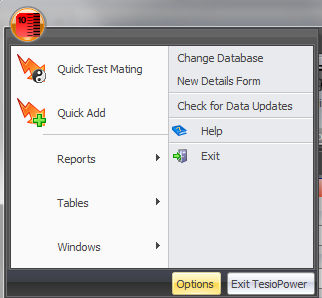
Then click the Options button to open the Options page.

The Build Number is on the first line, shown highlighted above.
If the currently available build (show at the very top of this page) is a higher number than displayed in your program, then you should consider downloading and installing the current build.
If you have an older version of TesioPower and need assistance please contact us.